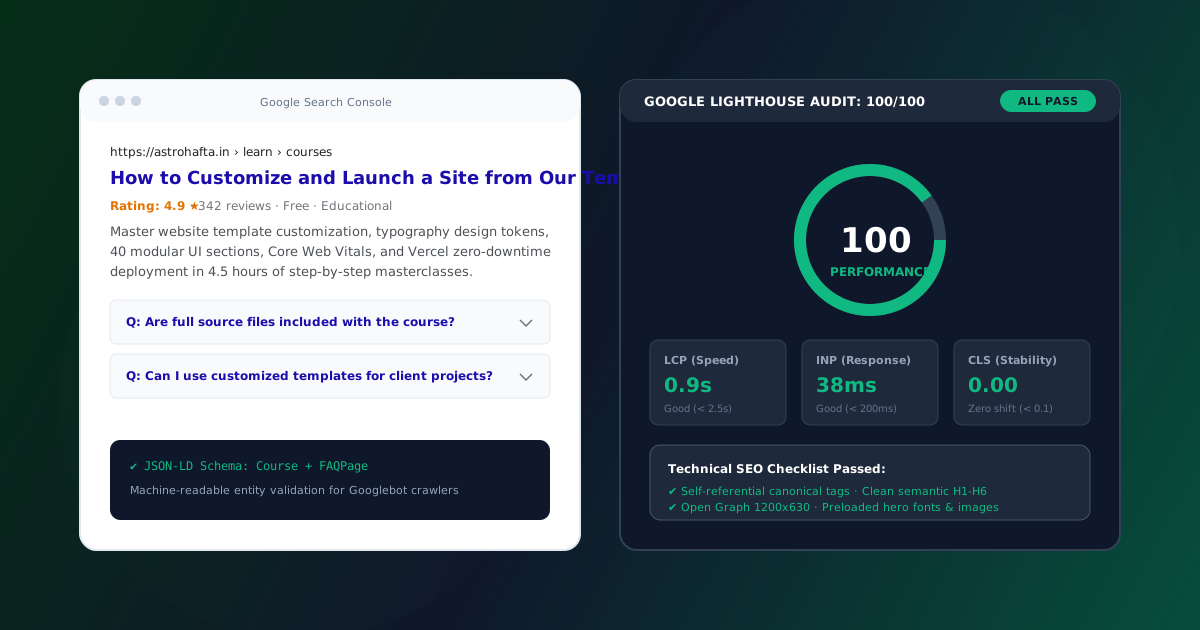
Building a visually stunning, responsive landing page is only half the battle. If search engine spiders cannot crawl your Document Object Model (DOM), decipher your semantic entities, or load your assets in under two seconds, your website will be buried on page five of search results where no customer will ever find it.
Many creators treat search engine optimization as an afterthought—something to be "sprinkled on" after the design is finalized by stuffing keywords into paragraph text.
In 2026, modern SEO is fundamentally an engineering discipline. When you build with clean semantic HTML, machine-readable JSON-LD structured schemas, sub-second Core Web Vitals, and proper canonical routing from day one, ranking for high-intent commercial keywords becomes a predictable, repeatable process.
Here is the definitive technical SEO field manual to audit and implement before launching any landing page into production.
1. Technical SEO & Crawlability Architecture#
Before search engine algorithms can evaluate your content or rank your page, Googlebot and Bingbot must be able to crawl and index your Document Object Model (DOM) cleanly without hitting crawl traps or wasting crawl budget.
1.1 The Self-Referential Canonical Tag#
Every landing page must declare a self-referential canonical URL. In digital marketing campaigns, tracking query parameters (?utm_source=facebook, ?gclid=xyz, ?ref=twitter) create infinite duplicate URL variants. Without a canonical tag, Google treats each variation as duplicate content and dilutes your domain's PageRank:
<!-- Prevent duplicate content penalties from marketing tracking parameters -->
<link rel="canonical" href="https://astrohafta.in/sections.php">
1.2 Trailing Slash & HTTPS Normalization#
Ensure your server configuration (via Apache .htaccess or Nginx) enforces a single canonical URL protocol. Serving both http:// and https://, or serving both /blog and /blog/ without a 301 redirect, splits link equity across two separate URIs.
# Apache .htaccess 301 Redirection to HTTPS & Non-WWW
<IfModule mod_rewrite.c>
    RewriteEngine On
    RewriteCond %{HTTPS} off
    RewriteRule ^(.*)$ https://%{HTTP_HOST}%{REQUEST_URI} [L,R=301]
</IfModule>
1.3 Robots.txt Directives & Sitemap Declaration#
Your robots.txt file must reside in the root directory and explicitly point search crawlers to your XML sitemap while disallowing administrative and private data directories:
User-agent: *
Allow: /
Disallow: /data/
Disallow: /database/
Disallow: /content/blog/*.md

Sitemap: https://astrohafta.in/sitemap.xml
2. Title Tags, Meta Descriptions & SERP Click-Through Rates#
Your </code> tag remains the single most influential on-page SEO signal you control. It tells search crawlers exactly what your page is about and determines the headline displayed in Search Engine Result Pages (SERPs).</p>
<h3 id="title-tag-formula" class="blog-heading-h3">Title Tag Formula<a href="#title-tag-formula" class="heading-anchor" aria-label="Anchor link to Title Tag Formula">#</a></h3>
<div class="code-block-wrapper"><div class="code-block-header"><div class="code-block-lang"><i class="bi bi-code-slash"></i> CODE</div><button class="copy-code-btn" type="button" onclick="window.copyCodeSnippet(this)" aria-label="Copy code to clipboard"><i class="bi bi-clipboard"></i> <span>Copy</span></button></div><pre class="code-block-pre"><code class="language-code">[Primary Keyword] - [Key Benefit or Value Proposition] | [Brand Name]
</code></pre></div>
<p class="blog-paragraph">For example:</p>
<div class="code-block-wrapper"><div class="code-block-header"><div class="code-block-lang"><i class="bi bi-code-slash"></i> HTML</div><button class="copy-code-btn" type="button" onclick="window.copyCodeSnippet(this)" aria-label="Copy code to clipboard"><i class="bi bi-clipboard"></i> <span>Copy</span></button></div><pre class="code-block-pre"><code class="language-html"><title>40 Modular UI Sections & Components - Stro Hafta</title>
<meta name="description" content="Browse 40 production-ready, modular UI sections: Navbars, Heroes, Pricing Tables, Bento Grids, Footers, and Forms. Instant source code included.">
<link rel="canonical" href="https://astrohafta.in/sections.php">
</code></pre></div>
<div class="blog-callout blog-callout-tip"><div class="blog-callout-header"><i class="bi bi-lightbulb-fill"></i> <strong>TIP</strong></div><div class="blog-callout-body"><strong>Length Constraints:</strong> Keep your title tags between <strong>50 and 60 characters</strong> (maximum 600 pixels width) and meta descriptions between <strong>140 and 155 characters</strong>. Anything longer will be truncated with an ugly ellipsis (<code class="blog-inline-code">...</code>) on mobile search screens.</div></div>
<h3 id="high-converting-meta-description-framework" class="blog-heading-h3">High-Converting Meta Description Framework<a href="#high-converting-meta-description-framework" class="heading-anchor" aria-label="Anchor link to High-Converting Meta Description Framework">#</a></h3>
<p class="blog-paragraph">Do not write passive descriptions. Frame your meta description as a mini-advertisement with an active command:</p>
<div class="blog-table-responsive"><table class="blog-table"><thead><tr><th>Page Type</th><th>Bad Meta Description</th><th>High-Converting Meta Description (With Action Verb)</th></tr></thead><tbody><tr><td><strong>Catalog / Store</strong></td><td>"Website templates available on our website."</td><td>"Browse 20 production website templates and 40 modular UI sections. Download clean unminified source code with lifetime commercial rights today."</td></tr><tr><td><strong>Course / Learn</strong></td><td>"Tutorial on how to build web pages."</td><td>"Master website template customization, CSS design tokens, and Vercel deployment in 4.5 hours of hands-on video masterclasses. Enroll free."</td></tr><tr><td><strong>Tool / Section</strong></td><td>"UI component library for developers."</td><td>"Copy 40 responsive HTML5 & CSS3 UI components: Navbars, Bento Grids, Pricing Tables, and Contact Forms. Zero bloat, instant copy."</td></tr></tbody></table></div>
<hr class="blog-divider">
<h2 id="3-open-graph-protocols-social-card-specifications" class="blog-heading-h2">3. Open Graph Protocols & Social Card Specifications<a href="#3-open-graph-protocols-social-card-specifications" class="heading-anchor" aria-label="Anchor link to 3. Open Graph Protocols & Social Card Specifications">#</a></h2>
<p class="blog-paragraph">When visitors or customers share your landing page on Twitter/X, LinkedIn, WhatsApp, Slack, or Discord, crawler bots scrape your Open Graph meta tags to render a rich link preview card.</p>
<p class="blog-paragraph">Without these tags, your link appears as a raw, untrusted text URL with no preview image, reducing social click-through rates by up to <strong>72%</strong>.</p>
<div class="code-block-wrapper"><div class="code-block-header"><div class="code-block-lang"><i class="bi bi-code-slash"></i> HTML</div><button class="copy-code-btn" type="button" onclick="window.copyCodeSnippet(this)" aria-label="Copy code to clipboard"><i class="bi bi-clipboard"></i> <span>Copy</span></button></div><pre class="code-block-pre"><code class="language-html"><!-- Open Graph Protocol (Facebook, WhatsApp, LinkedIn, Discord) -->
<meta property="og:type" content="website">
<meta property="og:site_name" content="Stro Hafta">
<meta property="og:url" content="https://astrohafta.in/learn/courses/how-to-customize-and-launch">
<meta property="og:title" content="How to Customize and Launch a Site from Our Template">
<meta property="og:description" content="Master template customization, typography tokens, UI sections, and Vercel deployment in 4.5 hours of step-by-step masterclasses.">
<meta property="og:image" content="https://astrohafta.in/assets/images/blog/custom-template.svg">
<meta property="og:image:width" content="1200">
<meta property="og:image:height" content="630">
<meta property="og:image:alt" content="Website Template Customization Masterclass Preview">
<!-- Twitter / X Card Protocol -->
<meta name="twitter:card" content="summary_large_image">
<meta name="twitter:site" content="@strohafta">
<meta name="twitter:title" content="How to Customize and Launch a Site from Our Template">
<meta name="twitter:description" content="Master template customization, typography tokens, UI sections, and Vercel deployment in 4.5 hours of video lessons.">
<meta name="twitter:image" content="https://astrohafta.in/assets/images/blog/custom-template.svg">
</code></pre></div>
<div class="blog-callout blog-callout-important"><div class="blog-callout-header"><i class="bi bi-exclamation-circle-fill"></i> <strong>IMPORTANT</strong></div><div class="blog-callout-body"><strong>Open Graph Image Standards:</strong> Ensure your <code class="blog-inline-code">og:image</code> dimensions are strictly <strong>1200x630 pixels</strong> (aspect ratio 1.91:1). Always use absolute URLs (<code class="blog-inline-code">https://...</code>), keep file size under 300KB, and verify that key text is centered within an 800x500px safe zone so it isn't cropped on mobile feeds.</div></div>
<hr class="blog-divider">
<h2 id="4-inject-structured-data-with-json-ld" class="blog-heading-h2">4. Inject Structured Data with JSON-LD<a href="#4-inject-structured-data-with-json-ld" class="heading-anchor" aria-label="Anchor link to 4. Inject Structured Data with JSON-LD">#</a></h2>
<p class="blog-paragraph">Structured data (schema markup) gives search engine spiders machine-readable metadata about your products, articles, FAQs, and courses. Pages with schema markup frequently win rich snippets in Google search results—like star ratings, pricing ranges, and expandable FAQ accordions.</p>
<p class="blog-paragraph">Always use <strong>JSON-LD</strong> (JavaScript Object Notation for Linked Data) injected in <code class="blog-inline-code"><script type="application/ld+json"></code> tags, which Google officially recommends over legacy microdata attributes.</p>
<h3 id="4-1-product-schema-for-templates-ui-bundles" class="blog-heading-h3">4.1 Product Schema (For Templates & UI Bundles)<a href="#4-1-product-schema-for-templates-ui-bundles" class="heading-anchor" aria-label="Anchor link to 4.1 Product Schema (For Templates & UI Bundles)">#</a></h3>
<div class="code-block-wrapper"><div class="code-block-header"><div class="code-block-lang"><i class="bi bi-code-slash"></i> HTML</div><button class="copy-code-btn" type="button" onclick="window.copyCodeSnippet(this)" aria-label="Copy code to clipboard"><i class="bi bi-clipboard"></i> <span>Copy</span></button></div><pre class="code-block-pre"><code class="language-html"><script type="application/ld+json">
{
"@context": "https://schema.org",
"@type": "Product",
"name": "40 UI Component Sections Library",
"image": "https://astrohafta.in/assets/images/sections-preview.png",
"description": "40 production-ready, modular UI sections: Navbars, Heroes, Bento Grids, Pricing Tables, and Footers.",
"brand": {
"@type": "Brand",
"name": "Stro Hafta"
},
"offers": {
"@type": "Offer",
"url": "https://astrohafta.in/sections.php",
"priceCurrency": "INR",
"price": "999",
"priceValidUntil": "2027-12-31",
"availability": "https://schema.org/InStock"
},
"aggregateRating": {
"@type": "AggregateRating",
"ratingValue": "4.95",
"reviewCount": "340"
}
}
</script>
</code></pre></div>
<h3 id="4-2-faqpage-schema-for-expandable-google-search-results" class="blog-heading-h3">4.2 FAQPage Schema (For Expandable Google Search Results)<a href="#4-2-faqpage-schema-for-expandable-google-search-results" class="heading-anchor" aria-label="Anchor link to 4.2 FAQPage Schema (For Expandable Google Search Results)">#</a></h3>
<p class="blog-paragraph">When you add FAQ schema, Google frequently displays your questions directly inside search results with expandable accordion toggles, taking up 2x more visual real estate on the search results page:</p>
<div class="code-block-wrapper"><div class="code-block-header"><div class="code-block-lang"><i class="bi bi-code-slash"></i> HTML</div><button class="copy-code-btn" type="button" onclick="window.copyCodeSnippet(this)" aria-label="Copy code to clipboard"><i class="bi bi-clipboard"></i> <span>Copy</span></button></div><pre class="code-block-pre"><code class="language-html"><script type="application/ld+json">
{
"@context": "https://schema.org",
"@type": "FAQPage",
"mainEntity": [
{
"@type": "Question",
"name": "Are complete unminified source files included with every template?",
"acceptedAnswer": {
"@type": "Answer",
"text": "Yes. Every template and UI section purchase includes complete, unminified HTML5, CSS3, JavaScript source code and SQL databases with full commercial rights."
}
},
{
"@type": "Question",
"name": "Can I build websites for paying clients using these templates?",
"acceptedAnswer": {
"@type": "Answer",
"text": "Yes. Our commercial licensing allows unlimited client projects with zero attribution required."
}
}
]
}
</script>
</code></pre></div>
<hr class="blog-divider">
<h2 id="5-semantic-heading-hierarchy-h1-to-h6" class="blog-heading-h2">5. Semantic Heading Hierarchy (H1 to H6)<a href="#5-semantic-heading-hierarchy-h1-to-h6" class="heading-anchor" aria-label="Anchor link to 5. Semantic Heading Hierarchy (H1 to H6)">#</a></h2>
<p class="blog-paragraph">Search engines use heading tags to build a topical outline of your page. A frequent mistake is using multiple <code class="blog-inline-code"><h1></code> tags or jumping from <code class="blog-inline-code"><h1></code> directly to <code class="blog-inline-code"><h4></code> for styling convenience.</p>
<p class="blog-paragraph">Follow these strict rules:</p>
<ol class="blog-ordered-list"><li><strong>One single <code class="blog-inline-code"><h1></code> tag</strong> per page representing the core topic.</li><li>Nest <code class="blog-inline-code"><h2></code> tags for major sections.</li><li>Nest <code class="blog-inline-code"><h3></code> tags only within their corresponding parent <code class="blog-inline-code"><h2></code>.</li><li>Never use heading tags purely for visual styling—use CSS utility classes instead.</li></ol>
<hr class="blog-divider">
<h2 id="6-core-web-vitals-optimization" class="blog-heading-h2">6. Core Web Vitals Optimization<a href="#6-core-web-vitals-optimization" class="heading-anchor" aria-label="Anchor link to 6. Core Web Vitals Optimization">#</a></h2>
<p class="blog-paragraph">Google uses Core Web Vitals as a direct ranking factor. You must pass all three core metrics:</p>
<ol class="blog-ordered-list"><li><strong>Largest Contentful Paint (LCP < 2.5s):</strong> Preload your main hero font and hero background image:</li></ol>
<div class="code-block-wrapper"><div class="code-block-header"><div class="code-block-lang"><i class="bi bi-code-slash"></i> HTML</div><button class="copy-code-btn" type="button" onclick="window.copyCodeSnippet(this)" aria-label="Copy code to clipboard"><i class="bi bi-clipboard"></i> <span>Copy</span></button></div><pre class="code-block-pre"><code class="language-html"> <link rel="preload" as="image" href="assets/images/hero-visual.webp" type="image/webp">
</code></pre></div>
<ol class="blog-ordered-list"><li><strong>Cumulative Layout Shift (CLS < 0.1):</strong> Set explicit <code class="blog-inline-code">width</code> and <code class="blog-inline-code">height</code> attributes on all images and video containers so the browser reserves space before the asset downloads:</li></ol>
<div class="code-block-wrapper"><div class="code-block-header"><div class="code-block-lang"><i class="bi bi-code-slash"></i> HTML</div><button class="copy-code-btn" type="button" onclick="window.copyCodeSnippet(this)" aria-label="Copy code to clipboard"><i class="bi bi-clipboard"></i> <span>Copy</span></button></div><pre class="code-block-pre"><code class="language-html"> <img src="preview.webp" width="600" height="400" alt="Template Preview" loading="lazy">
</code></pre></div>
<ol class="blog-ordered-list"><li><strong>Interaction to Next Paint (INP < 200ms):</strong> Defer non-critical JavaScript scripts with <code class="blog-inline-code">defer</code> or load them asynchronously so the main browser thread stays responsive to user taps.</li></ol>
<hr class="blog-divider">
<h2 id="7-xml-sitemap-robots-txt-hygiene" class="blog-heading-h2">7. XML Sitemap & Robots.txt Hygiene<a href="#7-xml-sitemap-robots-txt-hygiene" class="heading-anchor" aria-label="Anchor link to 7. XML Sitemap & Robots.txt Hygiene">#</a></h2>
<p class="blog-paragraph">Ensure your <code class="blog-inline-code">robots.txt</code> allows search engines to crawl all public landing pages and assets:</p>
<div class="code-block-wrapper"><div class="code-block-header"><div class="code-block-lang"><i class="bi bi-code-slash"></i> TXT</div><button class="copy-code-btn" type="button" onclick="window.copyCodeSnippet(this)" aria-label="Copy code to clipboard"><i class="bi bi-clipboard"></i> <span>Copy</span></button></div><pre class="code-block-pre"><code class="language-txt">User-agent: *
Allow: /
Sitemap: https://astrohafta.in/sitemap.xml
</code></pre></div>
<p class="blog-paragraph">And submit your <code class="blog-inline-code">sitemap.xml</code> directly inside Google Search Console immediately after launching.</p>
<hr class="blog-divider">
<h2 id="8-the-master-technical-seo-audit-scoring-matrix" class="blog-heading-h2">8. The Master Technical SEO Audit Scoring Matrix<a href="#8-the-master-technical-seo-audit-scoring-matrix" class="heading-anchor" aria-label="Anchor link to 8. The Master Technical SEO Audit Scoring Matrix">#</a></h2>
<p class="blog-paragraph">Before launching your landing page, evaluate your implementation against this 10-point technical checklist:</p>
<div class="blog-table-responsive"><table class="blog-table"><thead><tr><th>SEO Parameter</th><th>Optimal Target</th><th>Common Oversight</th><th>Verification</th></tr></thead><tbody><tr><td><strong>Title Tag</strong></td><td>50-60 chars, keyword + benefit</td><td>Truncated or generic "Home"</td><td>View Page Source</td></tr><tr><td><strong>Meta Description</strong></td><td>140-155 chars, click-worthy CTA</td><td>Missing or auto-scraped</td><td>SERP Preview</td></tr><tr><td><strong>Canonical URL</strong></td><td>Self-referential HTTPS link</td><td>Missing, creating duplicates</td><td>DevTools Elements</td></tr><tr><td><strong>Open Graph</strong></td><td>Valid 1200x630 image declared</td><td>Missing <code class="blog-inline-code">og:image</code></td><td>Social Card Validator</td></tr><tr><td><strong>Schema Markup</strong></td><td>JSON-LD Product or Article</td><td>None, losing rich snippets</td><td>Google Rich Results Test</td></tr><tr><td><strong>Heading Hierarchy</strong></td><td>Single H1, logical H2/H3 nesting</td><td>Multiple H1s or skipped levels</td><td>Headings Outline Extractor</td></tr><tr><td><strong>Image SEO</strong></td><td>Descriptive keyword alt text</td><td><code class="blog-inline-code">alt="image1.png"</code> or empty</td><td>Accessibility Audit</td></tr><tr><td><strong>Core Web Vitals</strong></td><td>LCP < 1.8s, CLS < 0.05, INP < 100ms</td><td>4MB images, layout shifts</td><td>PageSpeed Insights</td></tr><tr><td><strong>Robots.txt</strong></td><td>Allows all public crawl paths</td><td>Blocking CSS/JS assets</td><td><code class="blog-inline-code">astrohafta.in/robots.txt</code></td></tr><tr><td><strong>XML Sitemap</strong></td><td>Valid XML indexed in Search Console</td><td>Missing or broken links</td><td><code class="blog-inline-code">astrohafta.in/sitemap.xml</code></td></tr></tbody></table></div>
<hr class="blog-divider">
<h2 id="conclusion" class="blog-heading-h2">Conclusion<a href="#conclusion" class="heading-anchor" aria-label="Anchor link to Conclusion">#</a></h2>
<p class="blog-paragraph">Technical SEO is not mysterious or speculative. By adhering to this systematic blueprint—clean semantic markup, pixel-perfect metadata, validated JSON-LD rich snippets, sub-2-second Core Web Vitals, and proper indexing protocols—your newly launched landing pages will start out ahead of 90% of competitors in organic search.</p>
<p class="blog-paragraph">Explore our collection of <a href="index.php#templatesCatalogView" class="blog-link">Website Templates</a> engineered with pre-configured SEO metadata, clean semantic structure, and 100/100 Google Lighthouse scores out of the box.</p> </div>
<!-- Inline Template Cross-Sell CTA Banner -->
<div class="blog-inline-promo-card">
<div>
<span class="flagship-badge" style="background:rgba(130,180,64,0.25); color:#a3e635; margin-bottom:6px;">PRODUCTION ASSETS</span>
<h4>Build & Ship Faster with 40 Modular UI Sections</h4>
<p>Clean HTML5 & CSS3 components with instant copyable code and lifetime commercial license.</p>
</div>
<a href="../sections.php" class="btn-flagship-primary" style="white-space:nowrap; padding:12px 24px;">
<i class="bi bi-grid-fill"></i> Browse UI Library
</a>
</div>
<!-- Author Bio Footer Box -->
<div style="background:#f8fafc; border:1px solid #e2e8f0; border-radius:12px; padding:28px; margin:40px 0 28px; display:flex; align-items:center; gap:20px; flex-wrap:wrap;">
<div class="author-avatar-img" style="width:64px; height:64px; font-size:1.375rem; flex-shrink:0;">
AV </div>
<div style="flex:1;">
<div style="font-size:0.75rem; text-transform:uppercase; color:#82b440; font-weight:800; letter-spacing:0.04em;">Written By</div>
<div style="font-size:1.1875rem; font-weight:800; color:#0f172a; margin:2px 0 6px;">Arjun Varma</div>
<p style="font-size:0.9375rem; color:#475569; line-height:1.6; margin:0;">
Principal Design Systems Engineer at Stro Hafta. Specializing in frontend architecture, CSS design token systems, and conversion engineering for high-growth web products.
</p>
</div>
</div>
<!-- Previous / Next Article Navigation Grid -->
<div class="blog-post-nav-grid">
<a href="post.php?slug=10-landing-page-conversion-mistakes" class="blog-nav-card prev">
<span class="blog-nav-label"><i class="bi bi-arrow-left"></i> Previous Article</span>
<span class="blog-nav-title">10 Landing Page Conversion Mistakes (and How to Fix Them): The CRO Field Manual</span>
</a>
</div>
<!-- Article Footer Newsletter Block -->
<div style="background:linear-gradient(135deg, #0f172a 0%, #1e293b 100%); border-radius:14px; padding:36px; color:#ffffff; text-align:center; margin-top:20px;">
<span class="flagship-badge" style="margin-bottom:8px;">WEEKLY INBOX INSIGHTS</span>
<h3 style="font-size:1.5rem; font-weight:900; margin:0 0 10px; color:#ffffff;">Enjoyed this field manual?</h3>
<p style="font-size:0.9375rem; color:#94a3b8; max-width:520px; margin:0 auto 20px; line-height:1.6;">
Join 12,000+ creators receiving our weekly engineering breakdowns on template customization, conversion heuristics, and frontend code snippets.
</p>
<form class="edu-newsletter-form" style="margin:0 auto; max-width:440px;" onsubmit="event.preventDefault(); window.showToast('Thanks for subscribing!'); this.reset();">
<input type="email" class="edu-newsletter-input" placeholder="Your work email address" required>
<button type="submit" class="btn-edu-subscribe">Subscribe Free</button>
</form>
</div>
</article>
<!-- Right Sticky Sidebar Column -->
<aside class="blog-sidebar-sticky">
<!-- Table of Contents -->
<div class="blog-toc-card">
<div class="blog-toc-title">
<i class="bi bi-list-nested" style="color:#82b440;"></i> Table of Contents
</div>
<ul class="blog-toc-list">
<li class="blog-toc-item ">
<a href="#1-technical-seo-crawlability-architecture">
1. Technical SEO & Crawlability Architecture </a>
</li>
<li class="blog-toc-item level-3">
<a href="#1-1-the-self-referential-canonical-tag">
1.1 The Self-Referential Canonical Tag </a>
</li>
<li class="blog-toc-item level-3">
<a href="#1-2-trailing-slash-https-normalization">
1.2 Trailing Slash & HTTPS Normalization </a>
</li>
<li class="blog-toc-item level-3">
<a href="#1-3-robots-txt-directives-sitemap-declaration">
1.3 Robots.txt Directives & Sitemap Declaration </a>
</li>
<li class="blog-toc-item ">
<a href="#2-title-tags-meta-descriptions-serp-click-through-rates">
2. Title Tags, Meta Descriptions & SERP Click-Through Rates </a>
</li>
<li class="blog-toc-item level-3">
<a href="#title-tag-formula">
Title Tag Formula </a>
</li>
<li class="blog-toc-item level-3">
<a href="#high-converting-meta-description-framework">
High-Converting Meta Description Framework </a>
</li>
<li class="blog-toc-item ">
<a href="#3-open-graph-protocols-social-card-specifications">
3. Open Graph Protocols & Social Card Specifications </a>
</li>
<li class="blog-toc-item ">
<a href="#4-inject-structured-data-with-json-ld">
4. Inject Structured Data with JSON-LD </a>
</li>
<li class="blog-toc-item level-3">
<a href="#4-1-product-schema-for-templates-ui-bundles">
4.1 Product Schema (For Templates & UI Bundles) </a>
</li>
<li class="blog-toc-item level-3">
<a href="#4-2-faqpage-schema-for-expandable-google-search-results">
4.2 FAQPage Schema (For Expandable Google Search Results) </a>
</li>
<li class="blog-toc-item ">
<a href="#5-semantic-heading-hierarchy-h1-to-h6">
5. Semantic Heading Hierarchy (H1 to H6) </a>
</li>
<li class="blog-toc-item ">
<a href="#6-core-web-vitals-optimization">
6. Core Web Vitals Optimization </a>
</li>
<li class="blog-toc-item ">
<a href="#7-xml-sitemap-robots-txt-hygiene">
7. XML Sitemap & Robots.txt Hygiene </a>
</li>
<li class="blog-toc-item ">
<a href="#8-the-master-technical-seo-audit-scoring-matrix">
8. The Master Technical SEO Audit Scoring Matrix </a>
</li>
<li class="blog-toc-item ">
<a href="#conclusion">
Conclusion </a>
</li>
</ul>
</div>
<!-- Article Quick Stats -->
<div class="blog-toc-card" style="padding:20px;">
<div style="font-size:0.75rem; text-transform:uppercase; font-weight:800; color:#64748b; letter-spacing:0.04em; margin-bottom:12px;">ARTICLE DETAILS</div>
<div style="display:flex; flex-direction:column; gap:10px; font-size:0.875rem; color:#334155;">
<div style="display:flex; justify-content:space-between;">
<span style="color:#64748b;">Read Time:</span>
<strong>15 min read</strong>
</div>
<div style="display:flex; justify-content:space-between;">
<span style="color:#64748b;">Word Count:</span>
<strong>1344 words</strong>
</div>
<div style="display:flex; justify-content:space-between;">
<span style="color:#64748b;">Published:</span>
<strong>Oct 28, 2026</strong>
</div>
<div style="display:flex; justify-content:space-between;">
<span style="color:#64748b;">Category:</span>
<strong style="color:var(--learn-primary);">SEO</strong>
</div>
</div>
</div>
<!-- Sidebar Flagship Masterclass Promo -->
<div class="blog-toc-card" style="background:linear-gradient(135deg, #0f172a 0%, #1e293b 100%); color:#ffffff; border:1px solid #334155;">
<span class="flagship-badge" style="background:#82b440; color:#0f172a; margin-bottom:8px;">FREE VIDEO COURSE</span>
<h4 style="font-size:1.0625rem; font-weight:800; color:#ffffff; margin-bottom:8px; line-height:1.35;">How to Customize & Launch a Site</h4>
<p style="font-size:0.8125rem; color:#cbd5e1; line-height:1.5; margin-bottom:16px;">
Take the free 8-module video masterclass and learn to ship production sites from our templates in 4.5 hours.
</p>
<a href="../learn/course.php?slug=how-to-customize-and-launch" class="btn-flagship-primary" style="width:100%; justify-content:center; padding:10px; font-size:0.875rem;">
<i class="bi bi-play-circle-fill"></i> Watch Free Course
</a>
</div>
</aside>
</div>
<!-- Related Articles Row -->
<section class="edu-catalog-section" style="padding-top:20px; padding-bottom:80px;">
<div class="edu-section-title-wrap" style="margin-bottom:28px;">
<h2>Related Field Manuals</h2>
<p>Continue exploring our engineering and conversion optimization articles.</p>
</div>
<div style="display:grid; grid-template-columns:repeat(auto-fit, minmax(340px, 1fr)); gap:28px;">
<a href="post.php?slug=10-landing-page-conversion-mistakes" class="blog-post-card" style="padding:0; overflow:hidden;">
<div class="blog-card-cover-wrap" style="height:170px;">
<img src="../assets/images/blog/conversion-mistakes.svg" alt="10 Landing Page Conversion Mistakes (and How to Fix Them): The CRO Field Manual" class="blog-card-cover-img">
<span class="blog-card-badge-pill">Conversion</span>
</div>
<div style="padding:22px; display:flex; flex-direction:column; flex-grow:1;">
<div class="blog-post-header-meta" style="margin-bottom:8px;">
<span><i class="bi bi-clock"></i> 14 min read</span>
<span><i class="bi bi-calendar3"></i> Oct 26, 2026</span>
</div>
<h3 class="blog-post-title" style="font-size:1.1875rem; font-weight:800; line-height:1.35; margin-bottom:10px;">
10 Landing Page Conversion Mistakes (and How to Fix Them): The CRO Field Manual </h3>
<p class="blog-post-excerpt" style="font-size:0.875rem; color:#64748b; line-height:1.5; margin-bottom:16px;">
A deep dive into the 10 silent conversion killers sabotaging your landing page ROI. Discover behavioral design principles, the F-pattern scanpath, friction reduction math, and proven copywriting frameworks to triple your conversion rates. </p>
<div style="color:#82b440; font-weight:700; font-size:0.875rem; display:flex; align-items:center; gap:4px; margin-top:auto;">
Read Article <i class="bi bi-arrow-right"></i>
</div>
</div>
</a>
<a href="post.php?slug=customize-website-template-in-30-minutes" class="blog-post-card" style="padding:0; overflow:hidden;">
<div class="blog-card-cover-wrap" style="height:170px;">
<img src="../assets/images/blog/custom-template.svg" alt="How to Customize a Website Template in 30 Minutes: The Complete Production Guide" class="blog-card-cover-img">
<span class="blog-card-badge-pill">Tutorials</span>
</div>
<div style="padding:22px; display:flex; flex-direction:column; flex-grow:1;">
<div class="blog-post-header-meta" style="margin-bottom:8px;">
<span><i class="bi bi-clock"></i> 12 min read</span>
<span><i class="bi bi-calendar3"></i> Oct 24, 2026</span>
</div>
<h3 class="blog-post-title" style="font-size:1.1875rem; font-weight:800; line-height:1.35; margin-bottom:10px;">
How to Customize a Website Template in 30 Minutes: The Complete Production Guide </h3>
<p class="blog-post-excerpt" style="font-size:0.875rem; color:#64748b; line-height:1.5; margin-bottom:16px;">
The step-by-step masterclass on customizing any Stro Hafta production website template in under 30 minutes. Learn global CSS token engineering, zero-CLS Google Font pairing, modular UI section swapping, asset pipelines, and automated zero-downtime deployment. </p>
<div style="color:#82b440; font-weight:700; font-size:0.875rem; display:flex; align-items:center; gap:4px; margin-top:auto;">
Read Article <i class="bi bi-arrow-right"></i>
</div>
</div>
</a>
</div>
</section>
</main>
<!-- SITE FOOTER -->
<footer class="site-footer">
<div class="footer-inner">
<div class="footer-top-grid" style="grid-template-columns: 1.3fr repeat(4, 1fr);">
<!-- Newsletter Column -->
<div class="footer-newsletter-col">
<div class="footer-brand">
<svg viewBox="0 0 24 24" fill="currentColor" style="width:24px; height:24px; color:var(--primary);">
<path d="M12 2l3.09 6.26L22 9.27l-5 4.87 1.18 6.88L12 17.77l-6.18 3.25L7 14.14 2 9.27l6.91-1.01L12 2z"/>
</svg>
<span>stro <strong style="color:var(--primary);">hafta</strong></span>
</div>
<p class="newsletter-subtext">Fresh templates, UI sections, components (and zero bloat).</p>
<form class="newsletter-form" id="newsletterForm" onsubmit="event.preventDefault(); window.showToast('Thank you for subscribing to Stro Hafta newsletter!'); this.reset();">
<input type="email" class="newsletter-input" id="newsletterInput" placeholder="Your email address" required>
<button type="submit" class="newsletter-btn" aria-label="Subscribe">
<i class="bi bi-send-fill"></i>
</button>
</form>
<div class="newsletter-disclaimer">
Unsubscribe any time. Read our <a href="../privacy.php">Privacy Policy</a>.
</div>
</div>
<!-- Column 1: Website Templates -->
<div class="footer-col">
<h4 class="footer-col-heading">Templates & UI</h4>
<ul class="footer-links-list">
<li><a href="../index.php#templatesCatalogView">All 20 Codebases</a></li>
<li><a href="../sections.php"><strong>40 UI Sections Library</strong></a></li>
<li><a href="../design-assets.php">28 Design Assets & Kits</a></li>
<li><a href="../index.php?category=Landing+Page+Templates#templatesCatalogView">AI SaaS & Agents</a></li>
<li><a href="../index.php?category=E-Commerce#templatesCatalogView">E-Commerce Stores</a></li>
<li><a href="../index.php?category=Admin+Templates#templatesCatalogView">Admin Dashboards</a></li>
</ul>
</div>
<!-- Column 2: Learn & Education -->
<div class="footer-col">
<h4 class="footer-col-heading">Learn & Content</h4>
<ul class="footer-links-list">
<li><a href="../learn/index.php"><strong>Education Hub (/learn)</strong></a></li>
<li><a href="../learn/courses.php">Courses & Tutorials</a></li>
<li><a href="../learn/course.php?slug=how-to-customize-and-launch">Flagship Masterclass (Free)</a></li>
<li><a href="../learn/guides.php">Ebooks & Free Guides</a></li>
<li><a href="../learn/cheatsheets.php">Developer Cheat Sheets</a></li>
<li><a href="../blog/index.php"><strong>Engineering Blog (/blog)</strong></a></li>
</ul>
</div>
<!-- Column 3: Plans & Services -->
<div class="footer-col">
<h4 class="footer-col-heading">Plans & Services</h4>
<ul class="footer-links-list">
<li><a href="../pricing.php">Pricing & Licenses</a></li>
<li><a href="../pricing.php#sections-bundle">40 Sections Bundle (₹999)</a></li>
<li><a href="../pricing.php#all-access">All-Access Pass (₹4,999)</a></li>
<li><a href="../custom-development.php">Custom Development</a></li>
<li><a href="../licenses.php">Commercial License</a></li>
</ul>
</div>
<!-- Column 4: Company & Support -->
<div class="footer-col">
<h4 class="footer-col-heading">Company & Legal</h4>
<ul class="footer-links-list">
<li><a href="../about.php">About Stro Hafta</a></li>
<li><a href="../support.php">Support & Help Desk</a></li>
<li><a href="../contact.php">Contact Us</a></li>
<li><a href="../terms.php">Terms of Service</a></li>
<li><a href="../privacy.php">Privacy Policy</a></li>
</ul>
</div>
</div>
<!-- Footer Bottom Bar -->
<div class="footer-bottom-bar">
<div class="footer-ecosystem-links">
<a href="../index.php">Marketplace</a>
<a href="../sections.php">UI Library</a>
<a href="../design-assets.php">Design Assets</a>
<a href="../learn/index.php">Education Hub</a>
<a href="../blog/index.php">Blog</a>
<a href="../pricing.php">Pricing</a>
<a href="../custom-development.php">Custom Work</a>
<a href="../about.php">About</a>
<a href="../support.php">Support</a>
<a href="../contact.php">Contact</a>
<a href="../licenses.php">Licenses</a>
<a href="../terms.php">Terms</a>
<a href="../privacy.php">Privacy</a>
</div>
<div class="footer-copyright">
© 2026 Stro Hafta. All rights reserved. Full commercial source code included with every purchase.
</div>
<div class="footer-language-selector" onclick="window.showToast('Language: English (US)')">
<i class="bi bi-globe"></i>
<span>English</span>
<i class="bi bi-chevron-down" style="font-size:10px;"></i>
</div>
</div>
</div>
</footer>
<!-- LIVE PREVIEW DEVICE SIMULATOR MODAL -->
<div class="preview-modal-backdrop" id="previewModal">
<div class="preview-simulator-bar">
<div class="preview-title-info">
<span class="preview-site-name" id="simSiteName">Template Live Preview</span>
<span class="preview-badge-pill" id="simSiteBadge">LIVE</span>
</div>
<!-- Viewport Switcher Buttons -->
<div class="preview-device-switcher">
<button class="device-btn active" data-device="desktop"><i class="bi bi-display"></i> Desktop</button>
<button class="device-btn" data-device="laptop"><i class="bi bi-laptop"></i> Laptop</button>
<button class="device-btn" data-device="tablet"><i class="bi bi-tablet"></i> Tablet</button>
<button class="device-btn" data-device="mobile"><i class="bi bi-phone"></i> Mobile</button>
</div>
<div class="preview-modal-actions">
<button type="button" class="btn-sim-buy-wa" id="simBuyBtn" onclick="window.openBuyFromSimulator()"><i class="bi bi-cart-check-fill"></i> Buy <span id="simPriceTag">₹1,499</span></button>
<button class="btn-sim-action" onclick="window.reloadLivePreview()" title="Reload preview"><i class="bi bi-arrow-clockwise"></i></button>
<a href="#" target="_blank" class="btn-sim-open" id="simDirectLink"><i class="bi bi-box-arrow-up-right"></i> Open Full Tab</a>
<button class="btn-sim-action" onclick="window.closeLivePreview()" title="Close (Esc)"><i class="bi bi-x-lg"></i></button>
</div>
</div>
<div class="preview-frame-container">
<div class="preview-device-frame desktop" id="previewDeviceFrame">
<iframe src="about:blank" class="preview-iframe" id="previewIframe"></iframe>
</div>
</div>
</div>
<!-- BUY & CHECKOUT MODAL -->
<div class="buy-modal-backdrop" id="buyModal">
<div class="buy-modal-card">
<div class="buy-modal-header">
<div class="buy-modal-template-info">
<img id="buyModalImg" src="../assets/images/dashboard_preview.jpg" alt="Template Preview" class="buy-modal-thumb">
<div>
<h3 class="buy-modal-title" id="buyModalTitle">Template Name</h3>
<div class="buy-modal-category">
<span id="buyModalCategory">Dashboard / Admin</span> · <span id="buyModalBadge" class="card-badge">PRO</span>
</div>
</div>
</div>
<button type="button" class="buy-modal-close-btn" onclick="window.closeBuyModal()" aria-label="Close modal">
<i class="bi bi-x-lg"></i>
</button>
</div>
<div class="buy-modal-body">
<div class="license-selection-group">
<label class="license-option-card selected" id="licenseSingleCard" onclick="window.selectLicense('single')">
<div class="license-card-left">
<input type="radio" name="licenseType" id="licenseRadioSingle" value="single" checked class="license-radio">
<div>
<div class="license-name">Single Commercial License</div>
<div class="license-desc">Use for 1 commercial or client website. Lifetime updates.</div>
</div>
</div>
<div class="license-price-tag" id="licenseSinglePrice">₹1,499</div>
</label>
<label class="license-option-card" id="licenseAgencyCard" onclick="window.selectLicense('agency')" style="border: 2px solid rgba(130,180,64,0.5); background: rgba(130,180,64,0.08);">
<div class="license-card-left">
<input type="radio" name="licenseType" id="licenseRadioAgency" value="agency" class="license-radio" style="accent-color:var(--primary);">
<div>
<div class="license-name" style="color:#ffffff; font-weight:800; display:flex; align-items:center; gap:6px;">
<i class="bi bi-patch-check-fill" style="color:var(--primary);"></i> 👑 Lifetime All-Access Pass (Best Value)
</div>
<div class="license-desc">Unlocks ALL 20 Templates, 40 UI Sections, 28 Design Kits & 15 Courses for Life!</div>
</div>
</div>
<div class="license-price-tag" id="licenseAgencyPrice" style="color:var(--primary); font-weight:900; font-size:1.15rem;">₹1,999</div>
</label>
</div>
<div class="inclusions-box">
<div class="inclusions-title"><i class="bi bi-check-circle-fill" style="color:#16a34a;"></i> What's included in your delivery:</div>
<ul class="inclusions-list">
<li><i class="bi bi-check2"></i> Full source code ZIP</li>
<li><i class="bi bi-check2"></i> Clean HTML/CSS/JS/PHP</li>
<li><i class="bi bi-check2"></i> Instant Digital Delivery</li>
<li><i class="bi bi-check2"></i> 6 Months Technical Support</li>
<li><i class="bi bi-check2"></i> Commercial Rights</li>
<li><i class="bi bi-check2"></i> Database / SQLite Setup</li>
</ul>
</div>
<a href="#" target="_blank" class="btn-modal-whatsapp" id="btnModalWhatsApp">
<i class="bi bi-cart-check-fill"></i> Buy Now (<span id="btnModalPrice">₹1,499</span>)
</a>
<div style="font-size:12px; color:#64748b; text-align:center; display:flex; align-items:center; justify-content:center; gap:6px;">
<i class="bi bi-shield-check" style="color:#16a34a;"></i> Instant direct delivery · Full source code & documentation
</div>
<div style="margin-top:14px; text-align:center; padding-top:12px; border-top:1px dashed #334155;">
<a href="javascript:void(0)" onclick="window.closeBuyModal(); window.openCustomerPassModal();" style="color:#94a3b8; font-size:12px; text-decoration:underline;">
<i class="bi bi-key-fill" style="color:var(--primary);"></i> Already paid on WhatsApp? Unlock with registered phone number
</a>
</div>
</div>
</div>
</div>
<!-- UI SECTION LIVE PREVIEW & CODE MODAL -->
<div class="section-modal-backdrop" id="sectionCodeModal">
<div class="section-modal-card">
<div class="section-modal-header">
<div>
<div class="sec-modal-badge" id="secModalBadge">FREE CODE</div>
<h3 class="sec-modal-title" id="secModalTitle">Component Title</h3>
</div>
<div class="sec-modal-tabs">
<button type="button" class="sec-tab-btn active" id="secTabPreviewBtn" onclick="window.switchSectionTab('preview')"><i class="bi bi-eye"></i> Live Preview</button>
<button type="button" class="sec-tab-btn" id="secTabHtmlBtn" onclick="window.switchSectionTab('html')"><i class="bi bi-code-slash"></i> HTML</button>
<button type="button" class="sec-tab-btn" id="secTabCssBtn" onclick="window.switchSectionTab('css')"><i class="bi bi-palette"></i> CSS</button>
</div>
<button type="button" class="section-modal-close" onclick="window.closeSectionModal()" aria-label="Close modal">
<i class="bi bi-x-lg"></i>
</button>
</div>
<div class="section-modal-body">
<!-- Tab 1: Live Preview -->
<div class="sec-tab-pane active" id="secPanePreview">
<div class="sec-preview-viewport-bar">
<span>Viewport:</span>
<button type="button" class="vp-btn active" id="vpDesktop" onclick="window.setSectionViewport('100%')"><i class="bi bi-display"></i> Desktop</button>
<button type="button" class="vp-btn" id="vpTablet" onclick="window.setSectionViewport('768px')"><i class="bi bi-tablet"></i> Tablet</button>
<button type="button" class="vp-btn" id="vpMobile" onclick="window.setSectionViewport('390px')"><i class="bi bi-phone"></i> Mobile</button>
</div>
<div class="sec-iframe-container" id="secIframeContainer">
<iframe id="secPreviewIframe" class="sec-preview-iframe" sandbox="allow-scripts allow-same-origin"></iframe>
</div>
</div>
<!-- Tab 2: HTML Code -->
<div class="sec-tab-pane" id="secPaneHtml">
<div class="code-viewer-container" id="secHtmlViewerContainer">
<div class="code-actions-bar">
<span class="code-lang">HTML5 Clean Code</span>
<button type="button" class="btn-copy-code" id="btnCopyHtml" onclick="window.copySectionCode('html')">
<i class="bi bi-clipboard"></i> Copy HTML
</button>
</div>
<div class="code-content-wrapper" id="secHtmlContentWrapper">
<pre><code id="secHtmlCodeDisplay"></code></pre>
<!-- Premium Lock Overlay (shown if premium) -->
<div class="code-lock-overlay" id="secLockOverlay">
<div class="lock-card">
<div class="lock-icon">🔒</div>
<h4>Premium Component Code</h4>
<p>Get instant access to clean, copy-pasteable HTML5 & CSS3 with full commercial rights.</p>
<div class="lock-pricing">Only ₹299 (Lifetime License)</div>
<a href="#" target="_blank" class="btn-buy-section-now" id="btnBuySectionCode">
<i class="bi bi-cart-check-fill"></i> Buy Section Code (₹299)
</a>
<a href="https://wa.me/919318481173?text=Hi+Stro+Hafta%2C+I+want+to+purchase+all+40+UI+Component+Sections+bundle+for+%E2%82%B9999.+Please+share+instant+delivery+details." target="_blank" class="btn-lock-bundle">
<i class="bi bi-stars"></i> Or Unlock All 40 Sections for ₹999
</a>
</div>
</div>
</div>
</div>
</div>
<!-- Tab 3: CSS Code -->
<div class="sec-tab-pane" id="secPaneCss">
<div class="code-viewer-container">
<div class="code-actions-bar">
<span class="code-lang">CSS3 Stylesheet</span>
<button type="button" class="btn-copy-code" id="btnCopyCss" onclick="window.copySectionCode('css')">
<i class="bi bi-clipboard"></i> Copy CSS
</button>
</div>
<div class="code-content-wrapper">
<pre><code id="secCssCodeDisplay"></code></pre>
</div>
</div>
</div>
</div>
</div>
</div>
<!-- CUSTOMER PASS / UNLOCK MODAL -->
<!-- CUSTOMER ACCESS MODAL -->
<div class="customer-modal-backdrop" id="customerAccessModal">
<div class="customer-modal-card">
<div class="customer-modal-header">
<div class="customer-modal-brand">
<i class="bi bi-shield-lock-fill" style="color:var(--primary); font-size:1.4rem;"></i>
<div>
<h3 style="font-size:1.125rem; font-weight:800; color:#ffffff; margin:0;">Customer Access Pass</h3>
<p style="font-size:0.75rem; color:#94a3b8; margin:0;">Unlock paid courses & direct template downloads</p>
</div>
</div>
<button type="button" class="customer-modal-close" onclick="closeCustomerPassModal()"><i class="bi bi-x-lg"></i></button>
</div>
<div class="customer-modal-body">
<!-- ENTER PHONE FORM VIEW -->
<div class="cust-login-form-view">
<p style="font-size:0.875rem; color:#cbd5e1; line-height:1.5; margin-bottom:18px;">
Purchased the <strong>₹1,999 Lifetime All-Access Membership</strong> or any course/template on WhatsApp? Enter your WhatsApp phone number below to instantly unlock everything on this browser for life.
</p>
<form id="customerPhoneLoginForm" onsubmit="handleCustomerLogin(event)">
<div style="margin-bottom:16px;">
<label style="display:block; font-size:0.75rem; font-weight:800; text-transform:uppercase; color:#94a3b8; margin-bottom:6px;">
Your WhatsApp Phone Number
</label>
<div class="cust-input-wrap">
<span class="cust-input-prefix">+91</span>
<input type="tel" id="custLoginPhoneInput" class="cust-phone-input" placeholder="e.g. 9318481173" required autocomplete="tel">
</div>
</div>
<div id="custLoginAlert" style="display:none; padding:10px 14px; border-radius:8px; font-size:0.8125rem; margin-bottom:14px;"></div>
<button type="submit" class="btn-cust-unlock" id="btnSubmitCustLogin" style="background:var(--primary); color:#ffffff; font-weight:800;">
<i class="bi bi-unlock-fill"></i> Verify & Unlock Lifetime Access
</button>
</form>
<div class="cust-wa-help-note" style="border-color:rgba(130,180,64,0.3); background:rgba(130,180,64,0.08);">
<i class="bi bi-patch-check-fill" style="color:var(--primary); font-size:1.1rem;"></i>
<div>
Haven't purchased yet? Message us on WhatsApp <strong>+91 93184 81173</strong> to activate the <strong>₹1,999 Lifetime All-Access Membership</strong> and get unrestricted access to every template, UI section, design kit, and course!
</div>
</div>
</div>
</div>
</div>
</div>
<style>
.customer-modal-backdrop {
display: none;
position: fixed;
inset: 0;
background: rgba(0, 0, 0, 0.8);
backdrop-filter: blur(10px);
z-index: 9999;
align-items: center;
justify-content: center;
padding: 20px;
}
.customer-modal-backdrop.open { display: flex; }
.customer-modal-card {
background: #0f172a;
border: 1px solid #1e293b;
border-radius: 20px;
width: 100%;
max-width: 460px;
box-shadow: 0 25px 50px -12px rgba(0, 0, 0, 0.7);
overflow: hidden;
animation: modalPop 0.25s cubic-bezier(0.16, 1, 0.3, 1);
}
@keyframes modalPop {
from { opacity: 0; transform: scale(0.92); }
to { opacity: 1; transform: scale(1); }
}
.customer-modal-header {
padding: 20px 24px;
border-bottom: 1px solid #1e293b;
display: flex;
align-items: center;
justify-content: space-between;
background: #090d16;
}
.customer-modal-brand { display: flex; align-items: center; gap: 12px; }
.customer-modal-close { background: none; border: none; color: #64748b; font-size: 1.25rem; cursor: pointer; padding: 4px; }
.customer-modal-close:hover { color: #ffffff; }
.customer-modal-body { padding: 24px; }
.cust-input-wrap {
display: flex;
align-items: center;
background: #090d16;
border: 1px solid #334155;
border-radius: 10px;
overflow: hidden;
}
.cust-input-wrap:focus-within { border-color: var(--primary); box-shadow: 0 0 0 2px rgba(130, 180, 64, 0.25); }
.cust-input-prefix {
padding: 12px 14px;
background: #1e293b;
color: #94a3b8;
font-weight: 700;
font-size: 0.875rem;
border-right: 1px solid #334155;
}
.cust-phone-input {
flex: 1;
background: transparent;
border: none;
padding: 12px 14px;
color: #ffffff;
font-size: 1rem;
font-weight: 700;
outline: none;
}
.btn-cust-unlock {
width: 100%;
background: var(--primary);
color: #0b1120;
border: none;
border-radius: 10px;
padding: 14px;
font-size: 0.9375rem;
font-weight: 800;
cursor: pointer;
display: flex;
align-items: center;
justify-content: center;
gap: 8px;
transition: all 0.2s;
}
.btn-cust-unlock:hover { background: #72a035; transform: translateY(-1px); }
.cust-wa-help-note {
margin-top: 20px;
padding: 12px 14px;
background: rgba(37, 211, 102, 0.08);
border: 1px solid rgba(37, 211, 102, 0.25);
border-radius: 10px;
display: flex;
align-items: flex-start;
gap: 10px;
font-size: 0.75rem;
color: #e2e8f0;
line-height: 1.4;
}
.cust-logged-in-view { text-align: center; }
.cust-avatar-badge {
width: 54px;
height: 54px;
border-radius: 50%;
background: rgba(130, 180, 64, 0.15);
color: var(--primary);
display: flex;
align-items: center;
justify-content: center;
font-size: 1.6rem;
margin: 0 auto 12px;
}
.cust-unlocked-summary-box {
background: #090d16;
border: 1px solid #1e293b;
border-radius: 12px;
padding: 16px;
text-align: left;
}
.cust-perks-list { list-style: none; padding: 0; margin: 0; }
.cust-perks-list li {
font-size: 0.8125rem;
color: #cbd5e1;
display: flex;
align-items: center;
gap: 8px;
margin-bottom: 8px;
}
.cust-perks-list li i { color: var(--primary); }
.btn-cust-modal-secondary {
flex: 1;
background: #1e293b;
color: #ffffff;
border: 1px solid #334155;
padding: 10px 14px;
border-radius: 10px;
font-weight: 700;
font-size: 0.8125rem;
cursor: pointer;
}
.btn-cust-modal-danger {
background: rgba(239, 68, 68, 0.15);
color: #fca5a5;
border: 1px solid rgba(239, 68, 68, 0.3);
padding: 10px 14px;
border-radius: 10px;
font-weight: 700;
font-size: 0.8125rem;
cursor: pointer;
}
.btn-cust-modal-danger:hover { background: rgba(239, 68, 68, 0.3); }
/* Header Pill Styling */
.header-customer-pill {
display: inline-flex;
align-items: center;
gap: 6px;
background: rgba(15, 23, 42, 0.8);
border: 1px solid rgba(255, 255, 255, 0.12);
color: #e2e8f0;
padding: 7px 14px;
border-radius: 9999px;
font-size: 0.8125rem;
font-weight: 700;
text-decoration: none;
transition: all 0.2s;
cursor: pointer;
}
.header-customer-pill:hover {
border-color: var(--primary);
color: #ffffff;
}
.header-customer-pill.logged-in {
background: rgba(130, 180, 64, 0.15);
border-color: rgba(130, 180, 64, 0.4);
color: #bef264;
}
@media (max-width: 768px) {
.header-customer-pill {
width: 38px;
height: 38px;
padding: 0;
display: inline-flex;
align-items: center;
justify-content: center;
border-radius: 50%;
flex-shrink: 0;
}
.header-customer-pill .pill-text-desktop {
display: none !important;
}
.header-customer-pill i {
font-size: 16px;
margin: 0;
}
.customer-modal-backdrop {
padding: 12px;
}
.customer-modal-card {
width: 100%;
max-width: 100%;
border-radius: 16px;
}
.customer-modal-header {
padding: 16px 18px;
}
.customer-modal-body {
padding: 18px 16px;
}
.btn-cust-unlock {
font-size: 0.875rem;
padding: 12px 14px;
}
}
</style>
<script>
window.openCustomerPassModal = function() {
const m = document.getElementById('customerAccessModal');
if (m) m.classList.add('open');
};
window.closeCustomerPassModal = function() {
const m = document.getElementById('customerAccessModal');
if (m) m.classList.remove('open');
};
window.handleCustomerLogin = async function(e) {
e.preventDefault();
const phoneInput = document.getElementById('custLoginPhoneInput');
const alertBox = document.getElementById('custLoginAlert');
const btn = document.getElementById('btnSubmitCustLogin');
if (!phoneInput) return;
const rawPhone = phoneInput.value.trim();
if (!rawPhone) return;
btn.disabled = true;
btn.innerHTML = '<span class="spinner-border spinner-border-sm"></span> Verifying...';
alertBox.style.display = 'none';
try {
const formData = new FormData();
formData.append('action', 'login');
formData.append('phone', rawPhone);
const res = await fetch('../api/customer_auth.php', {
method: 'POST',
body: formData
});
const data = await res.json();
if (data.success) {
alertBox.style.display = 'block';
alertBox.style.background = 'rgba(130, 180, 64, 0.2)';
alertBox.style.border = '1px solid #82b440';
alertBox.style.color = '#bef264';
alertBox.innerHTML = '<i class="bi bi-check-circle-fill"></i> Access unlocked! Reloading...';
setTimeout(() => {
window.location.reload();
}, 800);
} else {
alertBox.style.display = 'block';
alertBox.style.background = 'rgba(239, 68, 68, 0.2)';
alertBox.style.border = '1px solid #ef4444';
alertBox.style.color = '#fca5a5';
alertBox.innerHTML = '<i class="bi bi-exclamation-triangle-fill"></i> ' + (data.error || 'Phone not found. Please contact us on WhatsApp.');
btn.disabled = false;
btn.innerHTML = '<i class="bi bi-unlock-fill"></i> Verify & Unlock Access';
}
} catch (err) {
alertBox.style.display = 'block';
alertBox.style.background = 'rgba(239, 68, 68, 0.2)';
alertBox.style.border = '1px solid #ef4444';
alertBox.style.color = '#fca5a5';
alertBox.innerHTML = 'Network error. Please try again.';
btn.disabled = false;
btn.innerHTML = '<i class="bi bi-unlock-fill"></i> Verify & Unlock Access';
}
};
window.logoutCustomerPhone = async function() {
try {
await fetch('../api/customer_auth.php?action=logout');
window.location.reload();
} catch (e) {
window.location.reload();
}
};
// Close on backdrop click
window.addEventListener('click', function(e) {
const m = document.getElementById('customerAccessModal');
if (m && e.target === m) {
m.classList.remove('open');
}
});
</script>
<!-- TOAST NOTIFICATIONS -->
<div class="toast-notice" id="toastNotice">Notification</div>
<div class="toast-container" id="toastContainer"></div>
<!-- SCRIPTS -->
<script src="../assets/js/main.js"></script>
</body>
</html>